Claude Console is Anthropic’s unified developer hub designed to streamline the prototyping, testing, and deployment of enterprise-grade AI applications. With the April 2026 launch of Claude Managed Agents, the platform has evolved from a simple prompt playground into a robust infrastructure-as-a-service (IaaS) layer for autonomous AI systems.

What Is Claude Console?
Accessible at console.anthropic.com, Claude Console serves as the central mission control for the entire Anthropic ecosystem. It provides developers with a high-fidelity environment to manage API keys, monitor real-time costs, and experiment with model parameters before moving to production code.
Beyond basic API access, the Console integrates several critical developer tools:
- Workbench: A browser-based sandbox for iterating on complex system prompts and testing tool-use logic across different model versions.
- API Management: Granular control over keys, including recent updates that track usage metrics and last-active timestamps to improve security and budget monitoring.
- Knowledge Hub: Direct access to interactive Jupyter notebooks and technical documentation for advanced features like PDF processing and embeddings.
Claude Another Powerfull Update: What is CLAUDE Advisor Strategy: Connect Opus, Sonnet, Haiku

Key Features of Anthropic’s Claude Console
The 2026 iteration of Claude Console focuses on reducing “infrastructure friction,” allowing developers to spend more time on agent intelligence rather than server management.
1. Frontier Model Access
Developers can toggle between specialized models optimized for specific workloads:
- Claude Opus 4.6: The flagship model for complex reasoning, autonomous coding, and high-stakes enterprise agents.
- Claude Sonnet 4.6: Balances speed and intelligence, making it the preferred choice for large-scale agentic workflows.
- Claude Haiku 4.5: Optimized for sub-second latency and high-volume, cost-sensitive tasks.
2. Session Inspector
One of the most significant upgrades is the Session Inspector. It provides a transparent, step-by-step trace of every interaction within an agent session. This includes raw tool calls, environment responses, and intermediate “Chain of Thought” reasoning, which is essential for debugging non-deterministic agent behavior.
Insight: In 2026, the competitive advantage in AI development has shifted from prompt engineering to observability—the ability to see exactly why an agent succeeded or failed in a multi-step task is now more valuable than the initial instruction.
What Are Claude Managed Agents?
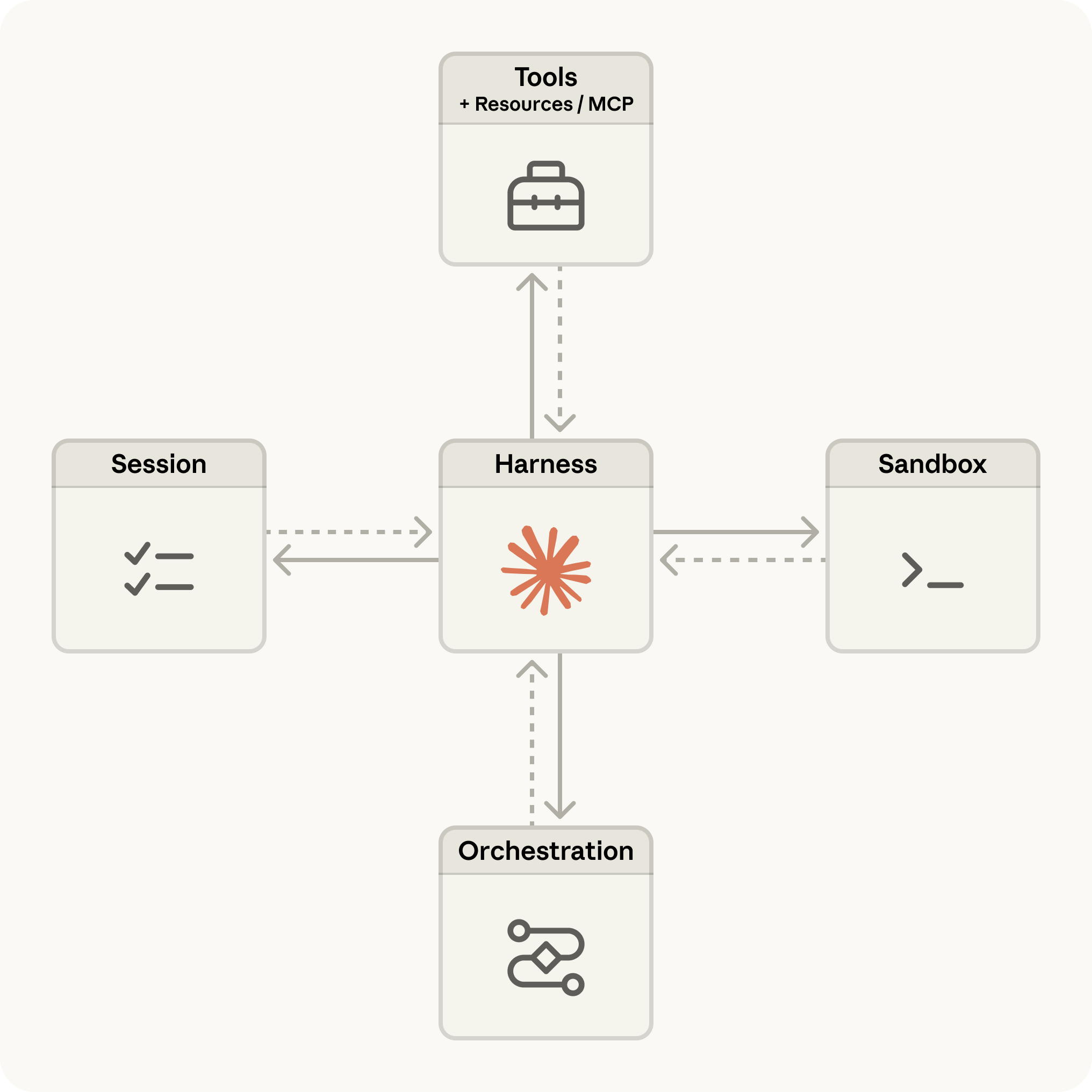
Claude Managed Agents is a fully hosted infrastructure service that automates the “plumbing” required to run autonomous AI. Traditionally, building an agent required developers to manually manage Docker sandboxes, maintain conversation state, and build retry logic for tool failures.
Managed Agents abstracts these complexities by providing:
- Persistent File Systems: Agents can save, read, and edit files across long sessions.
- State Management: The conversation history and environment state are maintained by Anthropic, eliminating the need for external databases for session memory.
- Secure Sandboxing: Each agent runs in a managed, isolated environment, protecting the host system while allowing the AI to execute code or search the web.
Why Managed Agents Matter in 2026
The shift toward managed infrastructure is driven by the increasing complexity of AI tasks. According to internal data from Anthropic, the autonomy of long sessions on tools like Claude Code has doubled in just three months—increasing from 25 to 45 minutes of uninterrupted, successful execution.
Managed Agents costs $0.08 per session hour in addition to standard token pricing. This “infrastructure-as-code” approach allows companies like Sentry and Rakuten to deploy hundreds of parallel sessions without building their own agent execution layers.
Insight: The “80/20 rule” of AI development—where 80% of time was spent on infrastructure—is being inverted. Managed environments allow teams to focus 90% of their energy on the business logic and persona of the agent.
Google is Also in the Race of AI: HOW to Use Google AI Edge Gallery: Use Gemma 4 Offline(2026)
Step-by-Step: Building an AI News Analyst Agent
To demonstrate the power of the platform, we will build an agent that autonomously searches for tech trends, analyzes sentiment, and writes a structured report to a file.
Step 1: Authentication and CLI Setup
First, export your API key and ensure you have the latest Anthropic CLI.
Bash
export ANTHROPIC_API_KEY="your-api-key-here"
brew install anthropic
Step 2: Define the Agent
Use the POST /v1/agents endpoint. We will utilize the agent_toolset_20260401, which provides built-in web search, bash execution, and file management capabilities.
Bash
agent=$(
  curl -sS https://api.anthropic.com/v1/agents \
  -H "x-api-key: $ANTHROPIC_API_KEY" \
  -H "anthropic-beta: managed-agents-2026-04-01" \
  -H "content-type: application/json" \
  -d '{
    "name": "AI News Analyst",
    "model": "claude-sonnet-4-6",
    "system": "You are an expert news analyst. Search the web, identify top themes, and save a structured report to trending_report.md.",
    "tools": [{"type": "agent_toolset_20260401"}]
  }'
)
AGENT_ID=$(echo $agent | jq -r '.id')
Step 3: Configure the Environment
An environment provides the “room” where your agent works. For this task, we enable unrestricted networking to allow Claude to access the live web.
Bash
environment=$(
  curl -sS https://api.anthropic.com/v1/environments \
  -H "x-api-key: $ANTHROPIC_API_KEY" \
  -H "anthropic-beta: managed-agents-2026-04-01" \
  -H "content-type: application/json" \
  -d '{
    "name": "news-env",
    "config": {
      "type": "cloud",
      "networking": {"type": "unrestricted"}
    }
  }'
)
ENVIRONMENT_ID=$(echo $environment | jq -r '.id')
Step 4: Execute the Session
Initiate a session and send the high-level prompt. Claude will now work autonomously.
Bash
curl -sS "https://api.anthropic.com/v1/sessions/$SESSION_ID/events" \
  -H "x-api-key: $ANTHROPIC_API_KEY" \
  -H "anthropic-beta: managed-agents-2026-04-01" \
  -H "content-type: application/json" \
  -d '{
    "events": [{
      "type": "user.message",
      "content": [{
        "type": "text",
        "text": "Find top AI topics from the last 24h and save a report to trending_report.md"
      }]
    }]
  }'
Real-World Use Cases and Comparisons
The adoption of Claude Console and Managed Agents marks a shift toward specialized AI workers in regulated industries.
- Cybersecurity & Debugging: Sentry utilizes these agents to analyze production errors and suggest fixes directly within the managed environment.
- Enterprise Insurance: Allianz has deployed Claude for building customized agents to handle complex sectoral workflows.
- E-commerce: Rakuten uses the platform for automated data enrichment and high-scale customer support.
Google’s AI Browser is on the way: What Is Google Disco: New Browser, Features & Full Guide
Platform Comparison: Claude vs. The Competition
| Feature | Claude Managed Agents | OpenAI Responses API | LangChain / OS |
| Infrastructure | Fully managed IaaS | Partially managed | Self-hosted |
| Built-in Tools | Web, Bash, Files, MCP | File search, Code | Custom-built |
| Persistence | Native stateful sessions | Limited session length | Manual storage |
| Tracing | Full Session Inspector | Limited logs | Custom setups |
According to performance benchmarks, Claude Opus 4.6 via Managed Agents often achieves higher success rates on multi-step tasks compared to GPT-5.4 through the OpenAI Responses API.

FAQ
Q. Is coding experience required for Claude Console?
While the Workbench is accessible to non-technical users for prompt testing, building Managed Agents requires basic knowledge of REST APIs or the Anthropic SDK. However, “Quick Start” templates are available to lower the barrier.
Q. How long can a session run?
Managed Agents are designed for long-running execution—from minutes to several hours—maintaining a persistent file system throughout the entire task.
Q. What tools does the agent have access to?
Out of the box, agents can use the agent_toolset_20260401, which includes web search, file operations, and bash execution.
Conclusion
The evolution of Claude Console signals the end of the “infrastructure era” for AI developers. By removing the need to manage servers, sandboxes, and state, Anthropic has allowed developers to focus on the only thing that matters: the intelligence and utility of the agent.
Whether you are automating technical support or building complex data analysts, the tools available at console.anthropic.com provide the most direct path to shipping production AI in 2026.
Ready to build? Visit the Claude Console to start your first session, or dive into the technical documentation for advanced configurations.
See More awesome post on our blog.