Google Antigravity 2.0 is Google’s agent-first development platform that combines a desktop app, Antigravity CLI, SDK, and Managed Agents in the Gemini API for multi-agent coding and automation workflows. If you care about testing, pricing, migration risk, and whether this is actually better than the current crop of agentic tools, this guide is for you.
I looked at Antigravity 2.0 less like a normal coding tool and more like Google’s attempt to control the full agent workflow: desktop, terminal, API, and pricing layer together.
Google Antigravity 2.0 is not just a renamed IDE. It is Google’s attempt to make multi-agent coding, background automation, and API-driven agent workflows feel like one product family, with the desktop app, CLI, SDK, and Gemini API all sharing the same agent harness. Google announced the shift at I/O 2026, alongside Managed Agents in the Gemini API and a new pricing push through Google AI Ultra.
Best overall: Antigravity 2.0 – strongest fit for people who want parallel agents, scheduled tasks, and a central control surface.
Best free option: Antigravity CLI – the terminal surface is available to everyone at launch, with the same core agent harness.
Best for beginners: Managed Agents in the Gemini API – one API call gets you a working agent in a sandboxed Linux environment, which lowers setup friction.
| Tool | Best For | Price | Free Plan | Rating |
|---|---|---|---|---|
| Google Antigravity 2.0 | Multi-agent orchestration in a desktop app | No charge to download; Google AI Ultra starts at $100/month for higher usage limits | Yes, base access is available | 4.8/5 |
| Antigravity CLI | Terminal-first agent workflows | No charge announced | Yes | 4.7/5 |
| Managed Agents in the Gemini API | Custom developer agents | Usage-based; model tokens billed at Gemini list rates | Preview compute is not billed | 4.6/5 |
| Google AI Ultra | Heavier Antigravity usage | $100/month | No | 4.4/5 |
What Is Google Antigravity 2.0?
Google Antigravity 2.0 is a standalone desktop application built for agent orchestration, not a traditional IDE with a few AI features bolted on. Google says the platform is designed to let you manage multiple autonomous agents in parallel, with dynamic subagents, scheduled tasks, and integrations across Google AI Studio, Android, Firebase, and enterprise workflows. Google’s official I/O 2026 developer post and the Antigravity 2.0 product page frame it as a central home for agent work, not just a chat box for code suggestions.
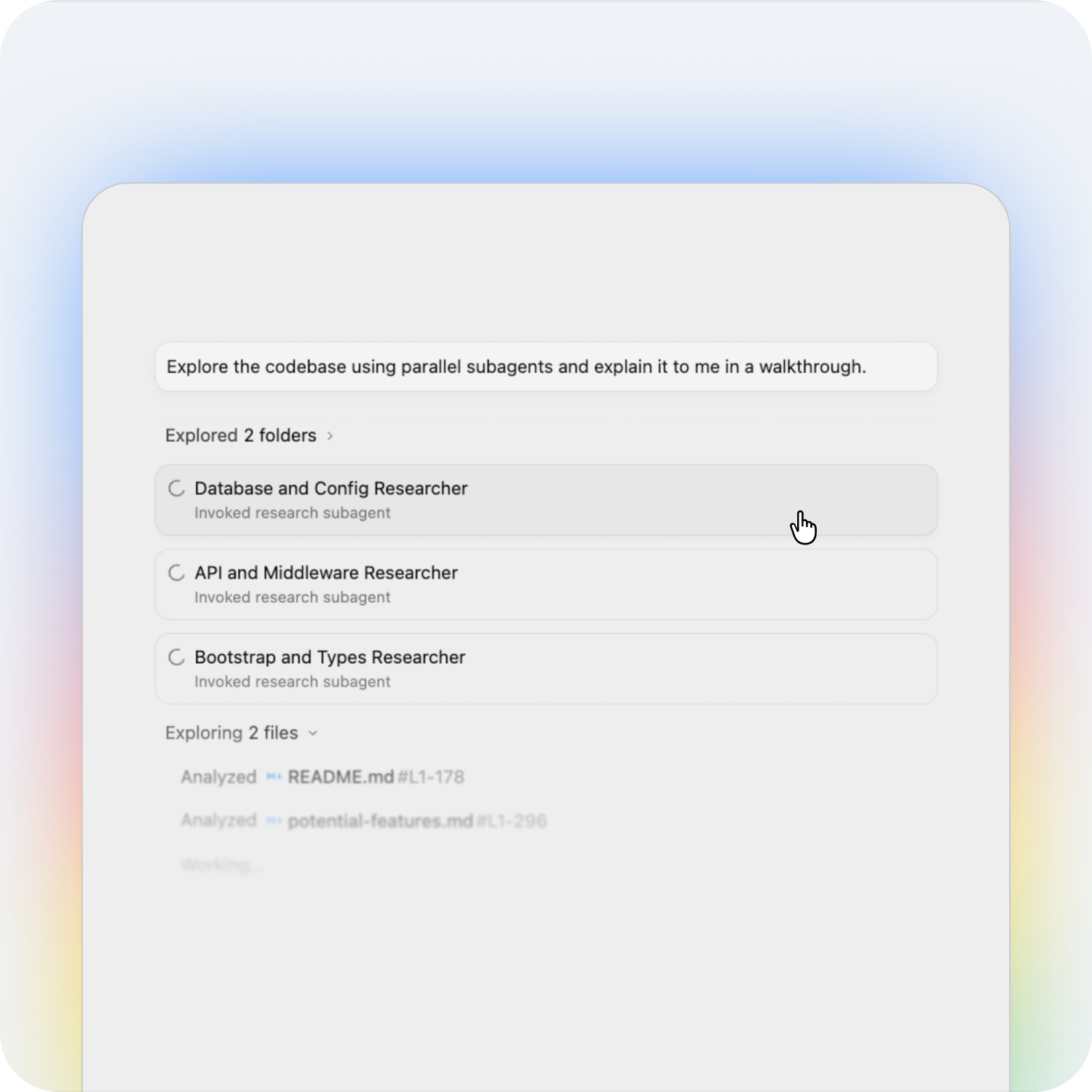
That distinction matters. A lot of current explainers talk about “another AI coding tool,” but the bigger shift is architectural: Antigravity 2.0 is built around agents that plan, execute, hand off work, and keep going in the background. In practice, that means a developer can ask one agent to scaffold a feature, another to run tests, and a third to review docs without waiting for everything to happen in one linear chat thread.
- What it is: A multi-agent development platform from Google.
- What it is not: Just a Gemini CLI rename or a thin IDE refresh.
- Why it matters: It turns agentic coding into a product system, not a feature.
For a similar shift in another part of Google’s stack, our breakdown of Gemini Intelligence shows how Google is pushing agents beyond the browser and into everyday workflows. If you like comparing agent products across ecosystems, our guide to ChatGPT Agents is a useful companion piece.
Google Launched Most Powerfull Video model: Google Omni AI Video Model is Really Wild: #7 Key Features

Why Google Rebuilt It Around Agents Instead of an IDE
Google’s own update on Gemini CLI makes the strategy clear: users outgrew the single-terminal, single-agent model and now need multiple agents communicating with each other over a unified backend. Google says Gemini CLI proved the terminal could work well for agentic tasks, but the new reality is multi-agent orchestration, background work, and shared infrastructure across desktop and terminal surfaces.
That is the real story behind Antigravity 2.0. Google is betting that the future of developer tools is not “the best autocomplete.” It is “the best agent runtime.” That means task decomposition, persistent state, parallel execution, and the ability to hand a job to the right surface without losing context.
A realistic example: imagine a product team shipping a landing page, a checkout flow, and an onboarding dashboard in the same week. One agent can draft the UI, another can write test coverage, a third can sanity-check analytics wiring, and a fourth can prepare release notes. That is much closer to a managed team than a coding assistant.
Antigravity 2.0 vs Antigravity CLI vs Managed Agents
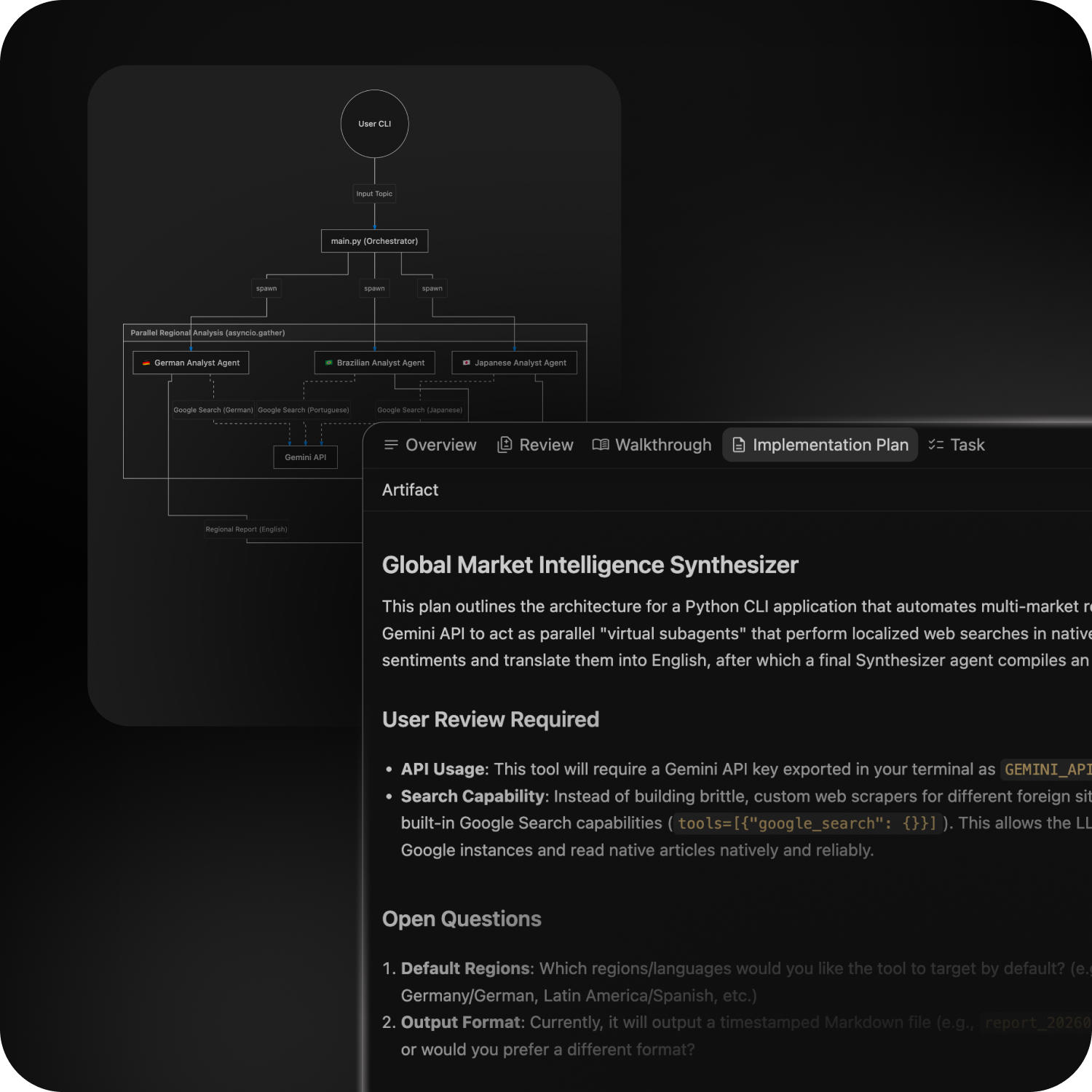
The cleanest way to understand Google Antigravity 2.0 is to separate the surfaces. Google says the desktop app is the orchestration layer, the CLI is the keyboard-first terminal layer, the SDK is for custom agent behavior, and Managed Agents in the Gemini API expose the same harness programmatically.
Desktop app: best for orchestration
Antigravity 2.0 is the place to run parallel agents, monitor progress, and manage larger projects. Google says it includes dynamic subagents and scheduled tasks, which makes it more useful for multi-step work than a plain chat interface. This is the surface you use when the job is broad, messy, and worth supervising.
CLI: best for terminal-first developers
Antigravity CLI is Google’s lightweight terminal experience. Google says it keeps the critical parts of Gemini CLI – Agent Skills, Hooks, Subagents, and Extensions, now reworked as plugins – while moving everything onto the same agent harness as the desktop app. If you live in a shell, this is the least disruptive path.
This is the part that will annoy existing Gemini CLI users. A migration deadline always sounds clean in a launch post, but in real workflows it means broken habits, changed commands, and a new trust test.
Managed Agents: best for developers shipping products
Managed Agents in the Gemini API are the cleanest option if you want to embed agent behavior into your own app or workflow. Google says a single API call can spin up an agent that reasons, uses tools, and executes code in an isolated Linux environment. That is the version of the product that feels closest to production infrastructure rather than a consumer-facing app.
What Google Antigravity CLI Actually Gives You
The Antigravity CLI is not a stripped-down toy. Google says it is built in Go for faster execution, supports asynchronous workflows, and can orchestrate multiple agents in the background without locking up your terminal session. That makes it a much better fit for large refactors, repo-wide research, and long-running build tasks than a simple prompt loop.
Google also says the CLI is available to everyone now, while Gemini CLI and Gemini Code Assist IDE extensions will stop serving requests for Google AI Pro, Ultra, and free individual users on June 18, 2026. That migration detail matters because it turns Antigravity CLI from a nice extra into the default terminal path. If you are already using CLI-based coding tools, this is the part of the story that affects your workflow immediately.
- Good fit: developers who want keyboard speed, background tasks, and less UI overhead.
- Weak spot: it is still less visual than the desktop app for multi-agent supervision.
- Best example: overnight refactors, repo cleanup, dependency upgrades, and test generation.
If you like agentic terminal tools, our posts on Claude Code for Vibe Coding and Grok Build CLI are good comparisons. The practical difference is that Antigravity is trying to be the umbrella platform, not just another CLI wrapper.
Managed Agents in the Gemini API: The Most Important Developer Piece
Managed Agents in the Gemini API are the most interesting part of this launch for builders. Google says they run on the same Antigravity agent harness, are powered by Gemini 3.5 Flash, and can keep state in persistent isolated environments that you can resume in follow-up calls. That is a strong design for workflows that need continuity, not one-shot responses. Google’s I/O post and the Managed Agents quickstart make that architecture explicit.
Google says these agents can reason, use tools, and execute code in an isolated Linux environment, and that environment compute is not billed during the preview period. Pricing is pay-as-you-go for Gemini model tokens and tool usage. In plain English: you pay for the intelligence layer, not for a fixed seat license, which is usually the right model for variable automation workloads.
Example: a growth team can create a nightly agent that reads new support tickets, clusters bugs, drafts a summary, and opens a task list for the morning. That kind of job is too repetitive for a human and too stateful for a single prompt. Managed Agents are built for exactly that middle ground.
- Pros: persistent state, isolated execution, tool use, and API-level control.
- Cons: costs can climb fast on long agent loops, especially if you leave prompts too open-ended.
- Best use case: productized agent features, workflow automation, research pipelines, and internal ops.

Pricing, Access, and What’s Still Unclear
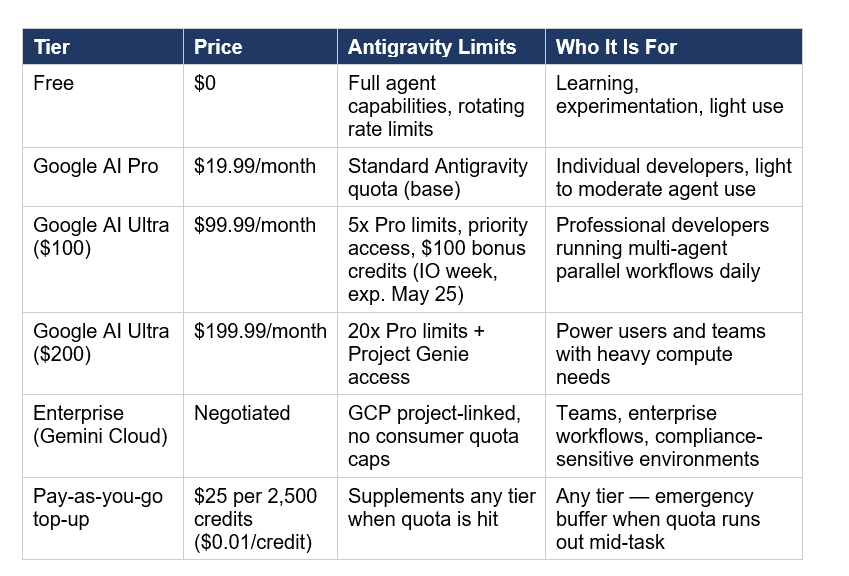
Google’s pricing story is split across tiers. The Antigravity home page says the product is available at no charge, while Google’s I/O post says Google AI Ultra starts at $100/month and brings a 5x higher usage limit in Antigravity than Google AI Pro. That means the entry point is free or free-to-start, but serious usage will likely push power users toward paid limits.
My honest concern is not the $100/month plan itself. The real concern is whether long-running agents make usage feel predictable or quietly expensive.
For Managed Agents, the official pricing page says model inference is billed at standard Gemini list rates, and preview environment compute is not billed. That is useful because it makes experimentation cheaper, but it also means a poorly scoped agent can still get expensive through token burn and tool loops. See Gemini API pricing on their Official Page for updated prices.
- Free-ish entry: Antigravity base access and CLI access are the easiest ways in.
- Paid scale: Google AI Ultra at $100/month is the obvious upgrade path for heavy users.
- Variable cost: Managed Agents scale with actual usage, which is better for products but harder to forecast.
For readers who want the broader context around Google’s agent ecosystem, our guide to Gemini Intelligence shows how Google is extending agents across Android, while ChatGPT Agents shows how OpenAI is taking a different route. That comparison is useful because Antigravity is more platform-shaped than many people expected.
What Google Antigravity 2.0 Gets Right – and What It Still Has to Prove
Google gets the product direction right. The desktop app, CLI, SDK, and Managed Agents all point to the same thesis: agents should be able to work in parallel, keep state, and move across surfaces without forcing developers to stitch together half a dozen separate tools. That is a much more coherent strategy than shipping isolated AI features one by one.
What still needs proving is polish. The important questions are practical: How predictable are the agents? How expensive are long runs? How much control do power users really get? How smooth is migration from Gemini CLI? And will the desktop app feel disciplined or bloated once real projects hit it day after day?
That’s the gap most launch coverage misses. The headline is easy. The real test is whether a developer can trust the system to do meaningful work without babysitting every step. Until those answers settle, Antigravity 2.0 is promising, but not automatically a default choice for every team.
What This Means for SEO and AI Search
If you publish about emerging AI products, Google’s own AI optimization guide is worth reading closely. Google says SEO still matters for generative AI features, pages must remain crawlable and indexable, and useful, unique content still wins. In other words, AI search does not replace SEO; it raises the bar on clarity and usefulness.
This article follows that logic on purpose: answer first, structured sections, concrete comparisons, and entity-rich language that makes the topic easy for both humans and AI systems to quote. For this topic, that means defining the product, separating the surfaces, explaining pricing, and spelling out the real trade-offs instead of just repeating launch hype.
That same approach is why the strongest Antigravity content will beat thinner summaries. The pages that explain what Antigravity 2.0 is, who should use the CLI, what Managed Agents cost, and where the migration deadline lands will be the pages people actually trust.
Frequently Asked Questions
What is Google Antigravity 2.0?
Google Antigravity 2.0 is Google’s agent-first development platform. It combines a standalone desktop app, a CLI, an SDK, and Managed Agents in the Gemini API so developers can orchestrate autonomous work across surfaces.
Is Google Antigravity 2.0 the same as Gemini CLI?
No. Google says Gemini CLI is being transitioned into Antigravity CLI, which shares the same agent harness as Antigravity 2.0 but is optimized as a terminal surface rather than a standalone desktop app.
Is Antigravity CLI free?
Google says Antigravity CLI is available to everyone at launch, and the home page describes Antigravity as available at no charge. Higher-usage users may still need paid limits through Google AI Ultra.
What are Managed Agents in the Gemini API?
Managed Agents are API-based agents that can reason, use tools, and execute code in an isolated Linux environment. Google bills model inference at standard Gemini list rates, while preview environment compute is not billed.
When does Gemini CLI stop working?
Google says Gemini CLI and Gemini Code Assist IDE extensions will stop serving requests for Google AI Pro, Ultra, and free individual users on June 18, 2026.
Who should use Antigravity 2.0 instead of the CLI?
Use the desktop app if you want to supervise multiple agents, manage parallel tasks, and keep a broader view of an ongoing project. The CLI is better if you live in the terminal and want speed with less interface overhead.
My Quick Verdict
Antigravity 2.0 looks less like a coding assistant and more like Google’s agent operating system for developers. The direction is strong, but pricing predictability, migration smoothness, and real project reliability will decide whether developers actually stick with it.
Conclusion: Should You Care About Google Antigravity 2.0?
Yes, especially if you build with agents or write about them. Google Antigravity 2.0 is one of the clearest signals yet that the next phase of developer tooling is moving from single-agent assistants to coordinated agent systems, with a desktop app for supervision, a CLI for terminal users, and Managed Agents for product builders.
For solo creators, the best entry point is the Antigravity CLI. For agencies and businesses, the desktop app plus Managed Agents is the more serious setup. For the lowest-friction start, base Antigravity access looks like the easiest way in, with Google AI Ultra at $100/month serving heavier users who need more headroom.
The main takeaway is simple: Google Antigravity 2.0 is not just another AI coding announcement. It is Google’s attempt to unify the agent stack around a single platform, and the part worth watching next is how quickly that platform becomes reliable enough for real production workflows. For related reading, explore our guides on Claude Code, ChatGPT Agents, and Gemini Intelligence.