Gemini 3 Deep Think is Google DeepMind’s latest flagship reasoning model designed to solve this by “thinking” before it speaks. It is a specialized mode within the Gemini 3 series that prioritizes logical depth, scientific accuracy, and multi-step planning over raw speed. Available to Google AI Ultra subscribers, it sets new industry records on benchmarks like ARC-AGI-2 (84.6%) and Humanity’s Last Exam (48.4%), effectively acting as a high-level research assistant for your business.
What is Gemini 3 Deep Think → The Expert Breakdown
Gemini 3 Deep Think isn’t just a chatbot; it’s a reasoning engine. Unlike standard models that predict the next word instantly, Gemini 3 Deep Think uses a “chain of thought” process to verify its own logic. Google DeepMind has integrated Gemini 3 Deep Think deeply into the Google Workspace ecosystem, making it one of the best AI tools for business today.
It features a massive 1 million token context window, allowing you to upload entire codebases, 1,000-page PDFs, or hours of video and ask complex questions without the model “forgetting” the beginning.
Key Highlight → It uses Thought Signatures, a feature that allows the model to maintain a consistent “train of thought” even across multi-turn conversations and complex API calls.
Takeaway → If you need an AI that can “read the room” and provide nuanced, insight-focused responses instead of clichés, Gemini 3 Deep Think is your new best friend.
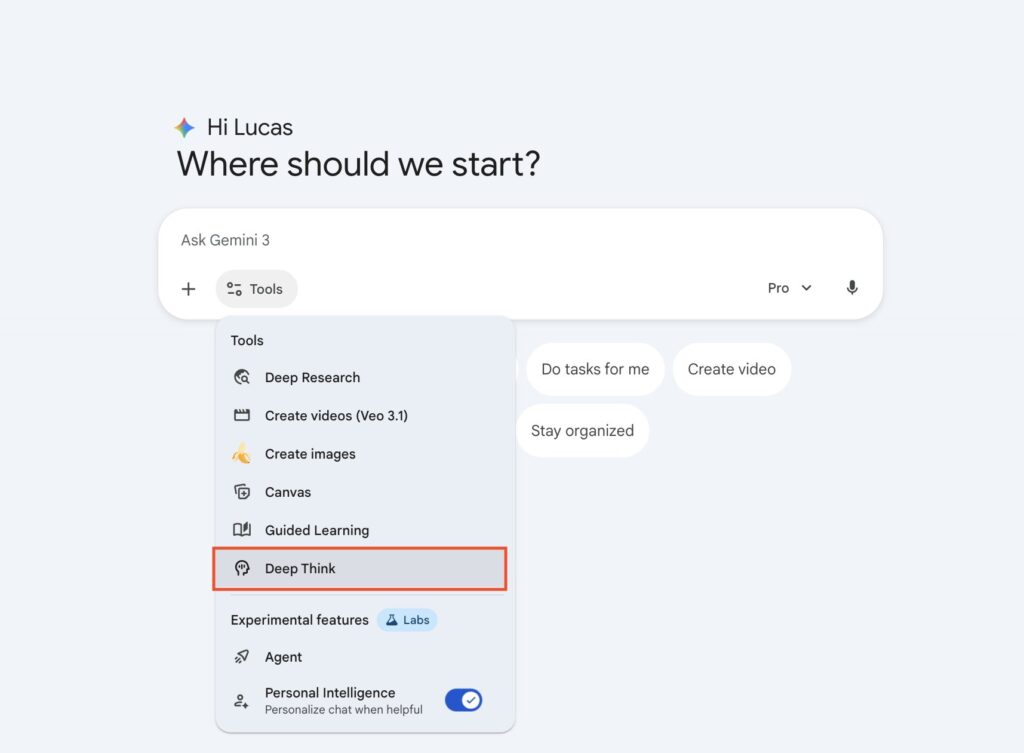
How to use Gemini 3 Deep Think → A Step-by-Step Guide
Getting started is simple, but you need the right setup to unlock its full potential.
- Subscription → Ensure you have a Google AI Ultra or Google AI Ultra for Business license.
- Platform → Access it via the Gemini Web App or the Gemini mobile app.
- Activation → In the prompt bar, select the Gemini 3 Pro model and toggle the “Gemini 3 Deep Think” button.
- Prompting → Ask a complex question. For example: “Analyze these 10 competitor websites and create a 6-month SEO strategy for Zypa.in using digital marketing automation tools.”
- Review the Chain → You can often see a summary of the steps the model took to reach its conclusion.
Pro Tip → For developers, use the thinking_level parameter in the Gemini API (set to high) to force maximum reasoning depth for tasks like agentic coding or complex refactoring.
Micro-CTA: Have you tried toggling Gemini 3 Deep Think yet? Try asking it to solve a logic puzzle that stumped GPT-4! 🚀
Gemini 3 Deep Think vs GPT 5.2 Pro → The Ultimate Comparison
The 2026 AI war is essentially between OpenAI’s GPT-5.2 Pro and Google DeepMind’s Gemini 3 Deep Think. Both are top-tier content creation software, but they excel in different arenas.
| Feature | Gemini 3 Deep Think | GPT 5.2 Pro |
|---|---|---|
| Context Window | 1 Million Tokens (Industry Leading) | 400,000 Tokens |
| Best For | Creative/Multimodal, Research, Google Ecosystem | Professional Knowledge Work, Structured Data |
| Benchmark (ARC-AGI-2) | 84.6% (Winner) | 54.2% |
| Coding Style | “Vibe Coding” (Fast UI/Frontend) | Engineering-Grade (Complex Logic) |
| Pricing | $20/mo (Ultra) | $200/mo (Pro) |
Why Gemini 3 Deep Think Wins for Creators 🎯
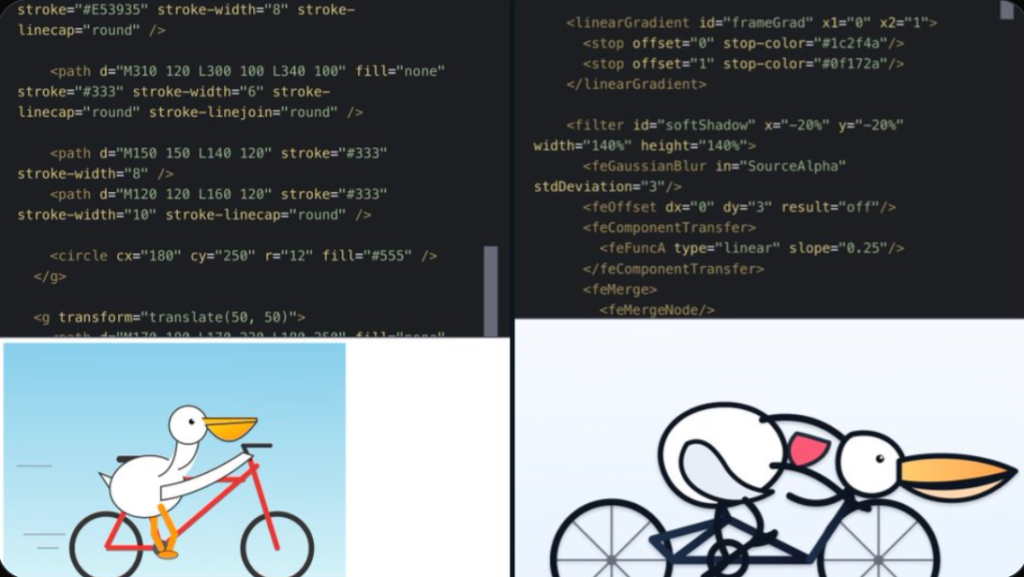
For those looking for the best software for creators, Gemini 3 Deep Think is the “Vibe Coding” king. It can take a rough sketch or a vague idea and turn it into a functional, beautiful web layout instantly. While GPT-5.2 Pro is a “dependable professional” for spreadsheets and legal briefs, Gemini 3 Deep Think feels more like a creative partner.
Why GPT 5.2 Pro Wins for Data Scientists 📊
GPT-5.2 Pro remains the benchmark for productivity software reviews when it comes to raw analytical depth. It is less likely to drift into “interpretive summaries” and stays more faithful to the granular stats of a research paper.
Question: Are you choosing ecosystem integration (Google) or raw engineering precision (OpenAI) for your 2026 workflow?
3 Growth Strategies from Google Creators (Applied to Gemini 3 Deep Think)
To truly succeed on platforms like Zypa.in, you need to combine AI power with human strategy. We analyzed the latest Google Creator Guides to find these three gems:
- The “Problem-First” Content Strategy Google’s top bloggers suggest that the best way to grow your audience is to identify a specific “pain point” and solve it in the first 30 seconds. AI Trick → Use Gemini 3 Deep Think to analyze your comments section and identify the #1 question your audience is asking. Use that as your next H1 header. 📌
- High-Value Audience Engagement Engagement isn’t just about likes; it’s about providing premium digital product ideas. Shortcut → Ask Gemini 3 Deep Think to: “Convert this blog post into a downloadable PDF template for a Content Calendar.” Selling digital templates online is one of the best ways to monetize your expertise. 💡
- “Vibe Coding” for Interactive Content Audience engagement thrives on interactivity. Trick → Instead of a static post, use Gemini 3 Deep Think to generate the code for an interactive calculator or a niche-specific quiz (e.g., “Which AI Tool is Right for Your Business?”). ⚡
Pricing & Value → Is Gemini 3 Deep Think Worth the Switch?
If you are already using SaaS comparison 2025 data to manage your budget, the pricing of Gemini 3 Deep Think is aggressive.
- Google AI Ultra → ~$20/month. This includes 2TB of cloud storage software, Gemini in Docs/Gmail, and full Gemini 3 Deep Think access.
- GPT-5.2 Pro → ~$200/month for the full research-grade experience.
For most marketing software for small business needs, Gemini 3 Deep Think offers a much higher ROI because of its integration with Google Search and Maps. It’s not just an AI writing assistant tool; it’s a business growth software suite.
Gemini 3 deep think review → Final Verdict
Gemini 3 Deep Think is the winner for anyone who deals with high-context information. If you are a YouTuber, a researcher, or a digital marketer who needs to process large amounts of data and turn it into “human-friendly” content, this is the gold standard.
However, if you are a backend developer building high-stakes financial systems, GPT-5.2 Pro’s structured execution might still hold the edge.
Key Takeaways for Zypa.in Readers 🚀
- 🎯 Leverage the Context → Use the 1M token window to analyze your entire year of content.
- 📈 Be Multimodal → Use its superior image and video understanding to create better scripts.
- ❤️ Stay Human → Use AI for the “Deep Thinking,” but keep your unique voice for the final edit.
Want to learn more about the best design tools 2025 has to offer? Check out our latest guide on Zypa.in/blog to stay ahead of the digital curve! 🔥
Disclaimer: AI technology evolves rapidly. Always verify critical data points and scientific facts generated by any AI model. For the latest official updates, visit the Google DeepMind Blog.