Google Firebase is now more than just a backend-as-a-service. It has developed into a full-stack, AI-powered “firebase for vibe coding” station when Google Firebase Studio was introduced. It enables you to create applications that are ready for production by only explaining them to Google’s sophisticated AI, Gemini, in plain English. Google Firebase takes care of the syntax while you concentrate on the concept (the vibe).
This approach will help you go from “I have an idea” to “Here is the live URL” in minutes rather than months.
The Development→ In 2026, What is Google Firebase?
Google Firebase’s real-time databases and authentication features won developers over for years. It served as the “easy button” for backends. However, the 2026 update has made it considerably more potent.
Imagine sitting next to a senior developer who is prepared to quickly set up the database, configure the server, and write all the boilerplate code. The new Google Firebase Studio is that.
Important 2026 Features in Brief:
- 🎯 Google Firebase Studio is an agentic development environment where you may communicate with Gemini to create apps.
- 🎯 App Prototyping Agent: Creates functional full-stack applications from sketches, screenshots, or text prompts.
- 🎯 Data Connect with Gemini: You won’t have to struggle with complicated database languages because it automatically creates SQL schemas and queries.
- 🎯 Genkit Integration: Integrated tools to enhance your own application with AI capabilities (such as chatbots or content producers).
Why this is important: You can now create 10x goods without becoming a 10x engineer. All you have to do is be a “Vibe Coder.”

Firebase for Vibe Coding
Before we get into the “how-to,” let’s define the catchphrase that is sweeping the tech industry.
Andrej Karpathy, an AI researcher, is credited with coining the term “firebase for vibe coding.” It describes a novel approach to programming in which code is not written line by line. Rather, you take on the role of manager or architect. You specify the intended result—the “vibe” of the application—and an AI agent (such as Google Firebase’s Gemini) takes care of the execution.
You Should Use these Awesome Grok Features:
The Vibe Way against the Old Way
The old method was to write a function, debug the syntax, look up the issue on Google, rewrite, and repeat.
The Vibe Way: “Create a login screen with a dark mode toggle and neon green accents.” -> AI constructs it. -> “Make the buttons rounder.” -> AI makes the necessary changes.
It’s quick and easy to use, and it’s making it possible for non-programmers to develop SaaS comparison 2025 tools or high-end digital product concepts without employing a development team.

How to use Google Firebase for Vibe Coding (Step-by-Step)
Are you prepared to construct? This is how to use Google Firebase Studio to crush it.
Step 1→ Use the App Prototyping Agent first
Open Google Firebase Studio and log in. Instead of a blank code editor, a prompt box will appear. Your command center is located here.
Try this exercise: “Create a freelance writer’s productivity dashboard.” It should have a graph displaying monthly earnings, a “Projects” column, and a “Pending Invoice” tracker. Adopt a simple, minimalistic style.
What occurs is that Gemini scaffolds the entire project rather than just writing a fragment. It establishes the database schema for storing invoices, builds the frontend (UI), and connects them.
Step 2→ Iterate quickly using the “Vibe Loop”
The initial iteration won’t be flawless. This is where the magic takes place. You get into the feedback loop.
- 📌 Review: Take a look at the live preview.
- 📌 Request: “Change the graph to a bar chart and add a button to export data to CSV.”
- 📌 Refine: Gemini makes real-time code modifications.
Pro Tip: You can share a snapshot of an app you like or a hand-drawn drawing if you have a specific design in mind. The agent will duplicate the structure after analyzing the visual data.
Step 3→ Manage Data Expertly (Without SQL)
The worrisome aspect is generally the data. No more. You can ask Gemini with Google Firebase Data Connect, “I need to store user profiles with their subscription tier and payment history.”
The PostgreSQL schemas and API code required to get that data will be generated by Gemini. It guarantees that your software is scalable and safe from the start.
Convert your Ideas to APP with this Google AI Tool:
Step 4→ Deployment with Just One Click
In the past, setting up servers, SSL certificates, and scaling rules were all necessary for app deployment. In Google Firebase Studio, select “Deploy to App Hosting.” Google takes care of the rest. Your app is operational on a worldwide CDN, accessible to both US users and users worldwide.
See: Google Antigravity: What Is It? IDE, Features, and Developer Use
Growth Strategy→ How Producers Can Use This to Study, Adjust, and Succeed.
To learn how to use Google Firebase for vibe coding for more than just coding, we examined the perspectives of leading Google Creators.
- Resolve Issues in Real Time
Successful creators create solutions rather than just content.
Approach: Pay attention to what your audience is saying. Do they have grievances about filing their taxes?
Action: Over the weekend, vibe-code a basic “Creator Tax Calculator” tool using Google firebase.
As a result, you provide a valuable instrument that increases authority and traffic. This is among the top creation strategy software currently on the market. - Involvement is a two-way street
Don’t construct in quiet. Tell us about your “firebase for vibe coding” experience.
Open Loop: Share on social media: “I’m developing an artificial intelligence tool to automate [Pain Point]. Which feature would you most like to see?
Community: Make use of the responses to direct your Google Firebase prompts. Tag those who provided you with ideas when you launch. This fosters a great deal of loyalty. - Make Money Off of Your Vibes
You can open up new revenue streams once you can develop apps quickly.
Micro-SaaS: Use subscription pricing techniques to charge a nominal monthly price for your tool.
Templates: Offer other developers the code template for sale.
Services: Use small business marketing tools to provide “Custom App in 24 Hours” services to nearby companies.
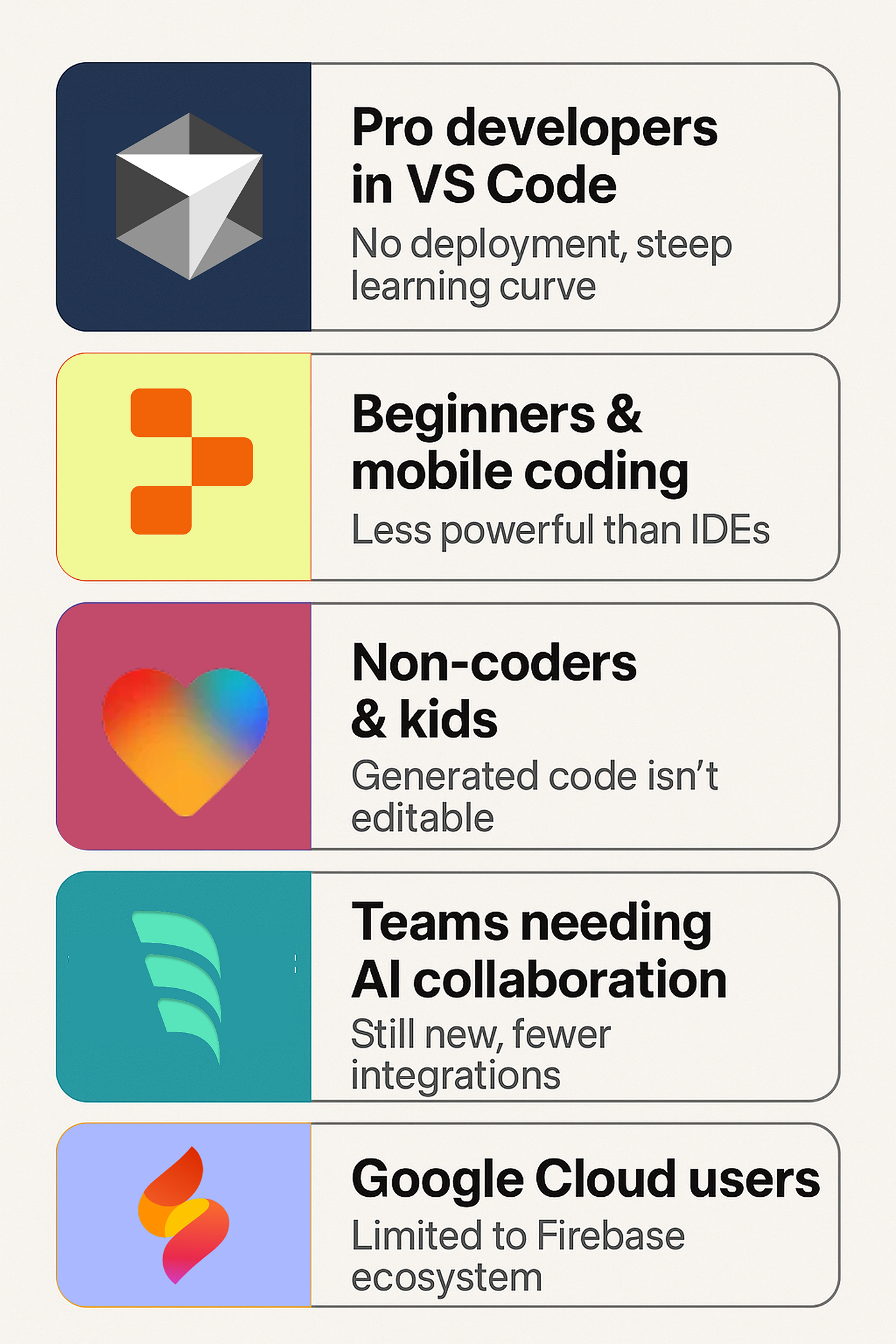
Google is also in the Race of Vibe Coding Now:
The Tech Stack→ The Tools You’ll Need
You need the appropriate toolkit in order to truly embrace this new era. Here is a brief summary of productivity apps that work well with Google Firebase:
- 🚀 Design: Use graphic design software to produce mockups that you can import into Gemini, such as Canva or Figma.
- 🚀 Marketing: To get leads from your new app, email marketing platforms use programs like ConvertKit or Mailchimp.
- 🚀 Analytics: To monitor who is using your app, use analytics software solutions (Google Analytics 4 is integrated into Google Firebase!).
- 🚀 AI Writing: Use AI writing tools to create the copy for the landing page of your app!
A split screen within Google Firebase Studio with a fully rendered dashboard app on the right and a natural language prompt on the left
In Conclusion, the future is uncertain.
There has never been a lower entrance hurdle for software developers. firebase for vibe coding and Google Firebase have made creativity more accessible. To create the next big thing, all you need is curiosity and a desire to learn the “vibe” workflow—a computer science degree is no longer necessary.
So let me ask you a question: Which app would you want to have fully developed right now if you could just snap your fingers? Let’s see if we can vibe code your vision into reality, so please share it in the comments section below!
See More Awesome Post on Our Blog.