
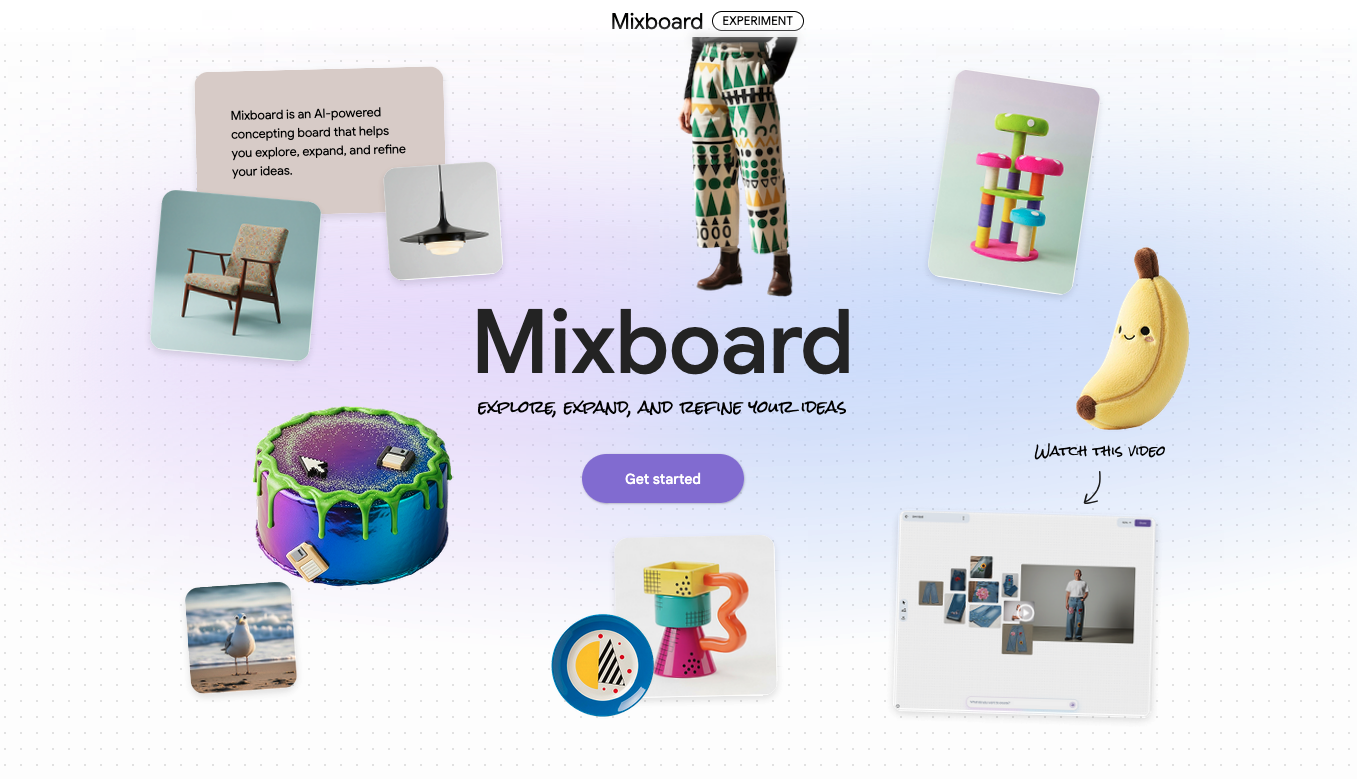
Google Mixboard is an AI-driven “concepting canvas” that lets you create dynamic, editable visual boards using text prompts and submitted photos. In contrast to Pinterest’s static mood boards, Google Mixboard allows you to remix, renew, and enhance images using natural language through the usage of a specific image-editing model called Nano Banana.

In essence, it’s a digital whiteboard that works with you to bridge the gap between an abstract concept and a concrete creative direction. We’ll look at how this AI design powerhouse and writing helper tool can improve your workflow in this guide.
What is Google Mixboard? → The Creative Standard for 2026
Google Labs created Google Mixboard as an experimental solution for the “messy” midpoint of the creative process. It’s neither a straightforward gallery like Pinterest, nor is it a final design program like Photoshop.
A few lines, such as “Minimalist U.S. workspace with warm oak wood and 2025 tech,” can be entered into this generative studio, and the AI will fill an endless canvas with pictures, color schemes, and even contextual text explanations.
Important Information You Should Know
- 🎯 Integration of Nano Bananas: A customized artificial intelligence model capable of doing intricate modifications such as “make the lighting warmer” or “combine these two textures.”
- 📌 Infinite Canvas: More space to grow your ideas thanks to a recent upgrade that makes it four times larger than the launch edition.
- 🚀 Contextual Text Generation: Based on what you’ve visually developed, it generates the “brief” for you rather than merely displaying photographs.
- 🔄 One-Click Iteration: Without leaving the page, buttons like “Regenerate” and “More Like This” enable quick brainstorming.
The lesson learned: Google Mixboard is your beginning point for any project if you’re a creative searching for the best design tools available in 2025.
You Should use this: How to Use Google Stitch: AI Features, Use Cases & Best Tips
Google Mixboard Uses → 3 Crazy Applications in 2026
Google Mixboard has three crazy uses in 2026.
1. Quick “Vibe Checks” from Clients (for Freelancers)
Freelancers frequently waste days on a job just to discover that they and the client weren’t in agreement. This is addressed by Google Mixboard, which lets you “live-prompt” during a discovery call.
The trick is to share your screen, type in the client’s keywords, and watch as the mood board appears on its own.
Growth Tip: Immediate feedback loops are the key to great retention, according to Google’s creator recommendations
The client feels like a co-creator when using Google Mixboard, which greatly increases trust.

2. Quick Digital Product Prototyping
Are you going to sell digital templates online? Use Google Mixboard to experiment with layout and color theory before opening Figma or Canva. A screenshot of a rival product can be uploaded, and you can instruct the AI to “Remix this with a high-contrast neon palette.”
Use Case: The secret to branding, according to a blogger with 500,000 readers, is visual consistency
Instead of taking weeks, Google Mixboard can help you achieve that “signature look” in minutes.
3. Campaign Planning and Storyboarding
Pre-visualization is the most challenging aspect for users of video editing software. With Google Mixboard, you may create a series of “mood frames.” To keep character and setting continuity throughout, you can prompt for “Scene 1: Golden hour in a NYC loft” and then use the “More Like This” function.
Have you ever experienced “blank canvas” syndrome? The remedy is a Google Mixboard. Try using just three words to begin your next endeavor.
What Fit’s you: ChatGPT Image 1.5 Prompts: Is this Better Than Nano Bana?

How to Use Google Mixboard → Step-by-Step Guide
- Get to the Lab: Visit Google Mixboard. (Note: It is currently accessible in more than 180 nations, including the United States).
- Begin with a “Seed”: To spark your creativity, you can either enter a prompt or select a pre-filled board.
- Use Natural Language to Refine: Select a picture that appeals to you. Enter “Make this look more vintage” or “Change the sky to a sunset” in the prompt box.
- The Google Mixboard’s “Mix”: To observe how the AI combines the styles of two distinct photographs, choose them and use the “Combine” command.
- Brief Export: Once you’re pleased, create a synopsis of your vision using the contextual text tool. This is ideal for internal team notes or productivity software reviews.
Google Mixboard AI → The Best Reasons It’s “Insane”
- 🎯 Regenerate New Views: You can get four new directions with just one click.
- 📌 Like a Human Designer, Nano Banana: Precision edits photos.
- 🚀 Text-to-Emotion: Early conceptualization transforms a single sentence into a complete piece of art.
Professional Growth Techniques for Artists Using Google Mixboard
You need a strategy in addition to tools if you want to succeed in the digital world of 2026. Three key takeaways from Google’s top creator insights are as follows:
- Avoid Over-Polishing: For the “messy” stage, use Google Mixboard. Authenticity and the “behind the scenes” procedure are now valued by readers and clients. It can be more interesting to display a Google Mixboard concept rather than a final PDF.
- The King is Automation: To close the gap between ideas and execution, use automation tools for creators. After your Google Mixboard is finished, use an AI writing helper tool to compose your project announcement using the generated text.
- Pay Attention to the Pain Point: “What problem does this visual solve for my audience?” should always be considered while producing content.
You Must know: What is ChatGPT 5.2 Code Red: OpenAIs ALERT-Level Update
Conclusion → Is Your Time Worth Using Google Mixboard?
Google Mixboard is a game-changer for business growth software for both US users and producers worldwide. It democratizes high-level design thinking and removes the hassle of beginning a new project. It is perhaps the best content production software for the ideation stage, but it cannot replace professional suites.
Are you prepared to change your thoughts? Today, try out a prompt. Leave the heavy visual labor to the AI, whether you’re planning a house renovation or anything else.
What will you prompt in Google Mixboard first? Tell us in the comments section below!






One Comment