To be honest, how many hefty ebooks, research papers, or 50-page PDFs are currently waiting to be read in your “Downloads” folder? With Google’s NotebookLM, you can now quickly Convert PDF to Podcast. When you submit your document and choose the “Audio Overview” option, NotebookLM’s AI evaluates the text and creates a natural-sounding, two-person conversation (two hosts discussing your topic) that summarizes and clarifies the content. It is really efficient, quick, and free.
We’ll walk you through the process in detail, explain why it’s revolutionary for creators, and show you how to Convert PDF to Podcast to expand your online profile.
Why Should You Care About NotebookLM? → Overview and Key Features
Google Labs’ experimental AI-first notepad is called NotebookLM. NotebookLM “grounds” its AI in the particular documents you upload, in contrast to traditional business AI products that merely summarize text into bullet points. It adheres to your source material and doesn’t hallucinate.
But the Audio Overview is the most notable feature. Unlike a robotic text-to-speech engine, it does more than simply read the material aloud. Rather, it produces a vibrant conversation between two AI “hosts” who ask each other questions, discuss the main ideas, and clarify difficult subjects with analogies.
Why this is important for artists→
- Repurposing Content→ Convert PDF to Podcast using NotebookLM right now.
- Accessibility→ Speak to audiences who would rather listen than read.
- Productivity→ While driving to work, “read” intricate study papers.
See These Features of NotebookLM Also:

How to Convert PDF to Podcast → A Step-by-Step Guide
Are you prepared to transform that complex PDF into a simple audio presentation?
Take these easy actions to Use NotebookLM to Create Podcast.
Step 1: Open NotebookLM
Go to NotebookLM and use your Google account to log in. You can use it for free right now.
Step 2: Open a Fresh Journal
On the dashboard, click the large “New Notebook” box. Give your notebook a title that relates to your PDF (for example, “My Ebook Draft” or “Market Research 2026”).
Step 3: Submit Your Source (PDF)
It will ask you to “Add sources.” A PDF can be pulled from Google Drive or uploaded straight from your computer.
Note→ If you want the podcast to combine data from numerous papers at once, you can upload multiple PDFs.
Step 4: Produce the Audio Synopsis
After uploading your source, search for the “Audio Overview” section, which is typically located at the top or right of the “Notebook Guide” panel. Press the “Generate” button.
Wait→ The AI’s analysis of the content and scripting of the dialogue takes several minutes.
Step 5: Download and Listen
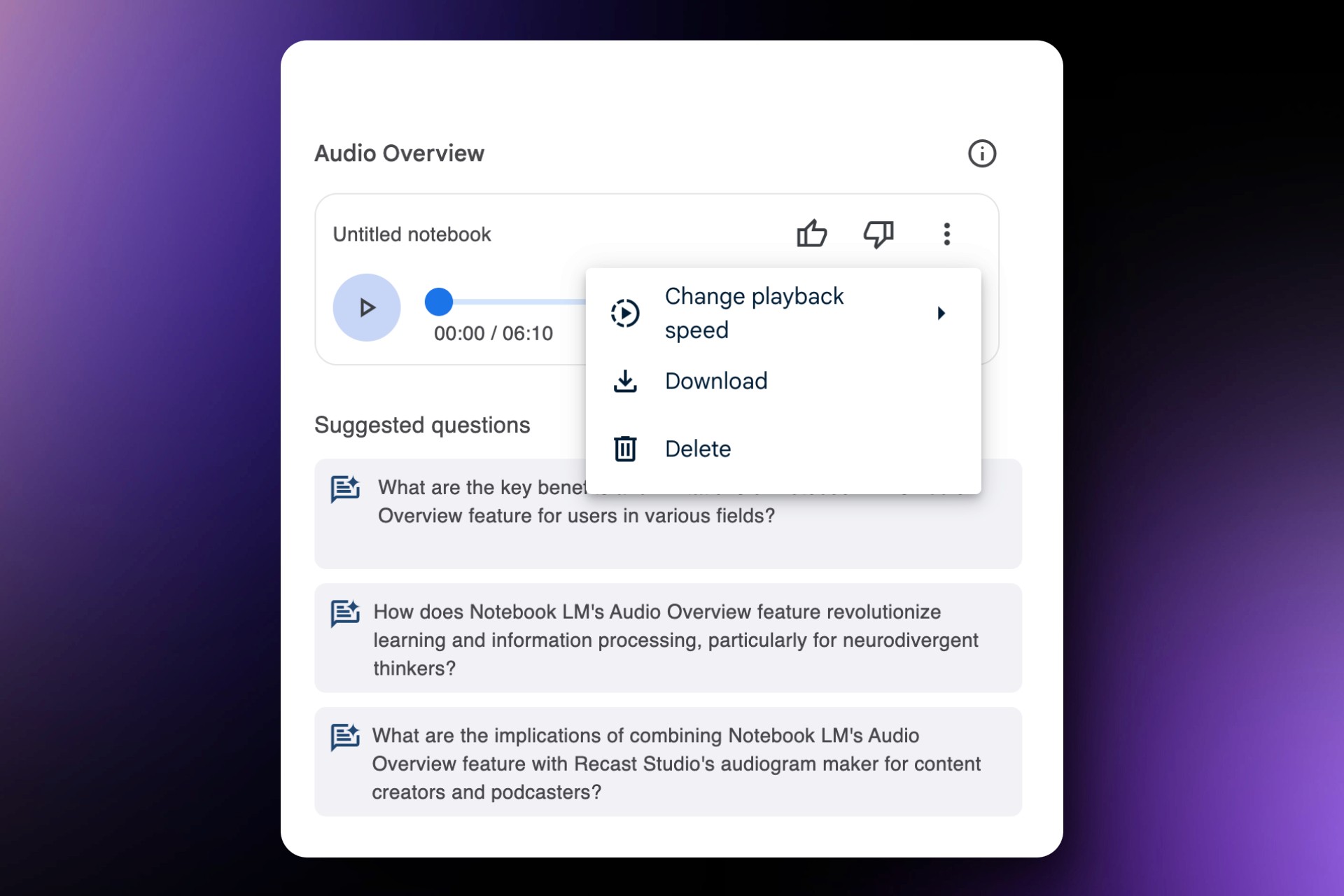
When it’s finished, a player will appear. To hear the two AI hosts talk about your PDF, hit play.
- Download: To save the .wav file, click the three dots adjacent to the player and choose Download.
- Share: To distribute the audio directly, you may also make a public link.
- Takeaway: This procedure requires no prior knowledge of audio editing and takes less than five minutes. It is possibly the greatest content creation software hack out there at the moment.

Notion Lover Must See this:
Three Ways to Leverage These Podcasts for Development: Strategies for Growth
It’s fantastic to just Create Podcast, but how can you use it to expand your company or brand? To discover how you can Use NotebookLM to Create Podcast, we examined the tactics used by leading Google creators.
- The “Teaser” Approach
Don’t simply distribute the entire PDF. As a teaser, use the Audio Overview.
The Plan→ Add a synopsis of your whitepaper or the first chapter of your ebook to NotebookLM.
The Execution→ Use the hook, “Listen to this AI discussion about my latest research,” when posting the audio clip on social media (LinkedIn or X). Do you want the complete data? Get the PDF below.
Why it works→ Giving “sneak peeks” generates a curiosity gap that encourages clicks, as suggested by Google’s creator guides. - Give Your Content a Human Touch (Even with AI)
Google clearly advises bloggers to humanize their brands. The content is your own, even though the voices are artificial intelligence.
Add an Intro→ Before the AI part begins, record a 15-second introduction in your own voice. “Hey, this is [Name],” you say. I simplified this difficult subject for you using artificial intelligence. Tell me what you think.
Engage your audience by posing a particular query about the audio. “Do you agree with the AI host’s take on point #3?” - Construct a “Listening Library”
Use this to create a value-add for your newsletter or a subscription pricing plan.
All of your long-form pieces should have audio versions available in a “Premium” section of your website.
Without needing hours of manual recording, this increases the perceived value of your subscription.
Expert Advice for Optimal Involvement: E-E-A-T Standards
You must adhere to the E-E-A-T (Experience, Expertise, Authoritativeness, and Trustworthiness) standards to make sure your content ranks and resonates.
Check the Output→ AI is not perfect. Make sure your PDF is appropriately reflected by always listening to the generated audio. When you publish, make the necessary corrections in the text description if the AI “host” misinterprets a fact.
Pay Attention to Headlines→ “Audio_123” is a file. Clicks on “wav” won’t occur. Make use of captivating headlines. As opposed to “Report Summary,” attempt “The Future of Marketing→ 2 Hosts Debate the New Data.”
Community Engagement→ Responding to your audience is crucial, according to Google’s creative team. Respond to each remark if you share these audio recordings. “Did this format help you understand the topic better?” is a question to pose to the audience.
📌 A Short Checklist for Your Initial AI Podcast→
- The uploaded PDF is primarily text-based (pictures don’t translate well to audio).
- The source material is reliable and correct.
- The audio was downloaded and its quality assessed.
- Added a personalized introduction and conclusion (optional but advised).
- Published with a compelling hook and call to action (CTA).
Automate Your Task:
In Conclusion: Final Thoughts and Action Plan
For audio content, the entry barrier has essentially disappeared. In only a few minutes, you may Create Podcast assets from your current papers using programs like NotebookLM. This technology is a huge productivity boost, whether you’re a student attempting to study more quickly, a business owner recycling whitepapers, or a creator searching for high-paying freelance tools to offer clients.
Your Plan of Action→
- Visit NotebookLM right now.
- Upload the lengthy PDF that you love (or dislike).
- Press “Generate.”
- Discover the enchantment of turning your reading list become a dialogue.
See more Awesome Blogs in Our Blogs.