OpenAI’s first “agentic” frontier model, ChatGPT 5.4, aims to go beyond text production to professional-grade reasoning and native computer use. It was released in March 2026 and has a large context window with one million tokens as well as direct software, mouse, and keyboard commands to finish multi-step operations.
We’ll go over how to use this new powerhouse to develop your online presence in this tutorial, as well as why professionals and creators alike are turning to it as their preferred company growth tool.
What’s New in ChatGPT 5.4? (In which ChatGPT 5.4 performs best)
You are aware that “Thinking” models altered the landscape if you have been following 2026’s trends in digital marketing. However, ChatGPT 5.4 represents a fundamental change in human-machine interaction rather than merely being a more intelligent version of its predecessors.
- Use of Native Computers
The “headline” feature is this. ChatGPT 5.4 contains built-in computer-use features, in contrast to earlier iterations that required intricate API wrappers or plugins. It can move the cursor, type, and “see” your screen through screenshots. It outperformed the human expert baseline of 72.4% with a score of 75.0% on the OSWorld-Verified benchmark. - The Context Window for One Million Tokens
Imagine entering a large software codebase, a 500-page legal document, or a year’s worth of financial data into a single prompt. ChatGPT 5.4 retains every detail from the first page to the last with a 1-million-token context window. For lengthy research and intricate project management, this makes it one of the most potent AI writing aids. - Mid-Response and Steerability Modifications
Waiting for a lengthy response only to discover it veered off course in the first paragraph was one of the most annoying aspects of AI. GPT-5.4 presents “Upfront Planning.” It displays its plan before beginning a complicated task. You can save time and tokens by interfering in the middle of a generation to change its direction.
ChatGPT 5.4 is now a cooperative partner rather than only a chatbot. Are you prepared to delegate your desktop tasks to an AI?

How to use ChatGPT 5.4
It’s easy to get started with the newest model, but to fully utilize it, you must comprehend the new Model Picker and Thinking Toggle.
Step 1: Model Selection
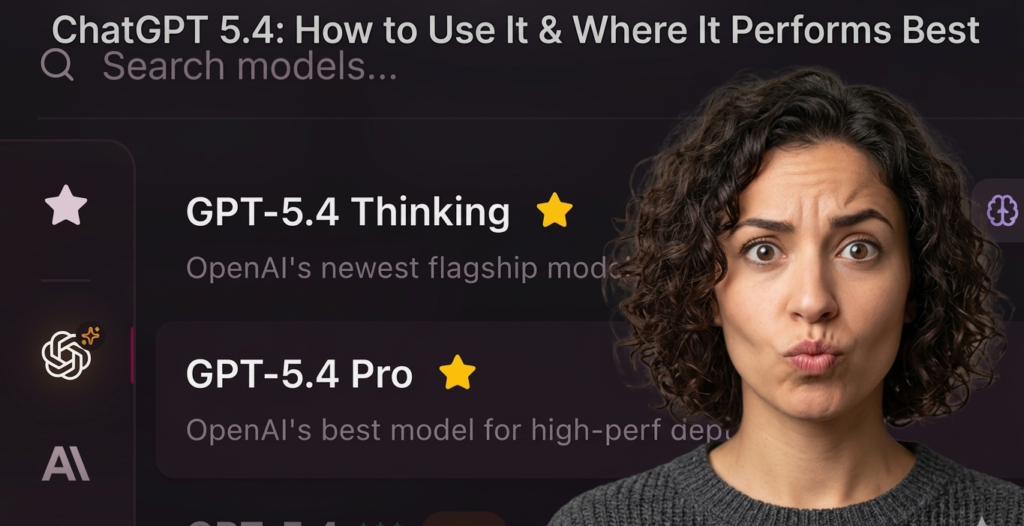
A revised model picker will be visible when you launch ChatGPT. You have four main choices, depending on whether you have a Plus, Team, or Pro subscription:
Auto: Automatically alternates between GPT-5.4 Thinking (for complexity) and GPT-5.3 (for speed).
Instant: Ideal for brief inquiries and simple software operations related to content development.
The standard for professional work is Thinking (ChatGPT 5.4). It solves complex problems by applying “Chain-of-Thought” logic.
Pro: “Heavy” thinking modes for research-grade intelligence are included.
Step 2: Using the “Thinking Time” Toggle
You may now modify the amount of “effort” the AI puts into a task via the message composer:
Standard: Strikes a balance between intelligence and speed. Ideal for knowledge work on a daily basis.
Extended: Perfect for reviewing SEO tools or conducting in-depth data analysis, it allows the model more time to “think” before reacting.
Step 3: Turning on Native Computer Utilization
You must provide the AI access to a simulated or real environment in order to utilize the computer-use capability (depending on your organizational settings).
You may just say: “Create a summary table in a new Excel sheet after opening Chrome and locating the top ten trending keywords for “Best design tools 2025.”
The AI will then carry out these actions in several programs without requiring you to copy and paste anything.
Have you used the recently introduced “Thinking” mode? It’s revolutionary for novices learning SEO. 🎯

ChatGPT 5.4 Use Cases
Despite being a general-purpose model, ChatGPT 5.4 has been tailored for three high-value domains: deep research, coding, and finance.
- “ChatGPT for Excel” with financial modeling
A specialized Excel integration driven by ChatGPT 5.4 Thinking was just released by OpenAI. The model’s performance in internal investment banking benchmarks increased from 43.7% (in GPT-5) to 87.3% (in ChatGPT 5.4).
What it does: Automates data extraction from cluttered files, scenario analysis, and three-statement modeling.
Why it matters: You can incorporate real-time market data into your workflow by integrating it directly with data from Moody’s, Dow Jones Factiva, and S&P Global.
- “Agentic” Workflows and Advanced Coding
According to the Artificial Analysis Coding Index, ChatGPT 5.4 is now the best model for developers.
Use the case study as a QA tester. It can write code, start a test browser, examine the results, find a UI fault, and correct the code all in one session because it can use a browser natively.
Context: It is particularly good in creating software as a service solutions from scratch and SaaS comparison 2025 activities.
- Deep Web Research “Needle-in-a-Haystack”
When it comes to extremely specialized inquiries, standard search engines frequently fall short. Because ChatGPT 5.4 use Agentic Web Search, it looks beyond Google’s first page. To locate the precise information you require, it “hunts” through several search rounds, follows links, and compiles data from several sources.
What tedious office work would you assign to an AI that could use your computer?

Is ChatGPT 5.4 Free
In order to counteract the high computational cost of the “Thinking” models, OpenAI has switched to a tiered usage model.
Tier GPT-5.3 (Instant/Mini) & ChatGPT 5.4 (Cognitive)
Free 10 messages every five hours Not available Plus/Team 160 messages per three hours 3,000 messages per week
Pro Unlimited”Heavy” reasoning combined with higher limits
Unlimited Enterprise Custom admin-controlled limits
The Pro tier is frequently the greatest investment for anyone seeking premium digital product ideas since it offers the “research-grade” intelligence required to create intricate automations or high-quality templates.
Growth Strategies → Using AI to Achieve Digital Success
Your objective as a Zypa.in creator is to use AI to expand your audience, not merely to use it. Here are three ways to include ChatGPT 5.4 into your growth strategy based on Google’s Creators knowledge.
- Create the Ideal “Hook”
According to Google’s analysis, a post’s start is its most important section. Create “curiosity gaps” that entice readers to scroll by analyzing the problems of your target audience with ChatGPT 5.4’s Professional Persona.
Pro Tip: Request that the AI “Write an intro that promises a solution to [Specific Problem] and asks a provocative question.”
- Use Repurposing to Diversify Your Content
Write more than a blog post. Feed your lengthy piece into the AI using the 1-million-token timeframe, and request that it produce:
A ten-slide LinkedIn carousel with the top design tools for 2025.
A YouTube short script (humanize your brand!).
An overview of your newsletter for your email marketing systems. - Decisions Based on Data
The lifeblood of digital expansion is engagement. Upload your audience engagement analytics using ChatGPT 5.4’s data analysis features, then ask it to identify trends. By determining which subjects generate more “shares” as opposed to “clicks,” it might assist you in fine-tuning your content schedule.
Are you prepared to make money? See our advice on using AI-generated designs to sell digital templates online. 🚀

Technical Tricks & Shortcuts for Power Users
Remember these shortcuts to make the most of your automation tools for creators:
The “Plan First” Rule states that complicated instructions should always begin with “First, provide a detailed plan of how you will approach this task.” The steerability feature is activated as a result.
Prompt Sequencing: Use this sequence while creating images or designing user interfaces: Subject -> Aspect Ratio -> Lighting -> Setting -> Brand Colors.
Context Management: Make use of the “Tool Search” function if you are working on a large project. This keeps the interaction quick and effective by enabling the AI to load only the tool definitions it requires.
Conclusion → The Collaborative Intelligence Era
For online business tools, ChatGPT 5.4 is a significant advancement. It is now more about guiding a partner and assigning a procedure than it is about posing a query and receiving an answer. The secret to success in 2026 is flexibility, whether you use it as a high-level research assistant or as a digital marketing automation tool.
The people who learn to work with AI will be the ones who prosper in this new environment, according to Anthropic founder Dario Amadei. Start creating your future instead of waiting for it to happen to you.
What are you going to do next?
Take action: On your next challenging endeavor, try the “Thinking” mode.
Participate: Tell us how you intend to use the one million-token window in the comments section below.
Stay tuned to Zypa.in, your home for digital success, for additional information on the greatest software for creators and company growth software.
FAQ’s (Frequently Asked Questions)
Q. What are the key differences between ChatGPT-4 and ChatGPT-5?
Answer: While ChatGPT-4 revolutionized reasoning and multimodal input, ChatGPT-5 is expected to offer significantly deeper reasoning capabilities, improved memory (retaining context over longer periods), and a drastic reduction in “hallucinations.” It acts more as a proactive AI collaborator than a simple reactive chatbot.
Q. Will ChatGPT-5 be free for all users?
Answer: Based on OpenAI’s historical rollout patterns, ChatGPT-5 will likely be available first to Plus, Team, and Enterprise subscribers. However, a limited or “mini” version is often eventually released to free users, similar to how GPT-4o became accessible to everyone.
Q. How does ChatGPT-5 improve on long-term memory?
Answer: Unlike previous versions that “forget” previous conversations once a session ends, ChatGPT-5 is designed with persistent memory. This means it can remember your specific brand voice, preferences, and past projects across different chats, making it much more efficient for long-term workflows.
Q. Can ChatGPT-5 handle video and real-time audio better than GPT-4?
Answer: Yes. ChatGPT-5 is built to be “natively multimodal.” This means it doesn’t just process text and images separately; it can understand and generate video, complex audio, and even interact with your screen in real-time with much lower latency than GPT-4.
Q. Is it still necessary to learn Prompt Engineering for ChatGPT-5?
Answer: Absolutely. While ChatGPT-5 is better at understanding “intent,” advanced techniques like Persona Prompting and Chain-of-Thought are still essential to get high-quality, professional results. Using expert prompts (like the ones we provide at Zypa.in) helps you bypass the generic “AI-style” output.
Q. When is the official release date for ChatGPT-5?
Answer: OpenAI has not confirmed a specific date, but industry leaks and CEO Sam Altman’s interviews suggest a major model release (likely GPT-5 or a “Strawberry” powered successor) is slated for late 2024 or early 2025.